
Pillar guide
Shopify store credit: the complete merchant guide
How Shopify store credit actually works in 2026. The merchant playbook for refunds, retention, and bulk credit issuance, on every Shopify plan.
Shopify store credit, the facts
Verified against Shopify documentation and App Store listings, August 2026.
| Native on Shopify? | Yes on Shopify Plus. Not available on Starter, Basic, Grow or Advanced without an app. |
|---|---|
| Bulk issuance built in? | No, on any plan. Shopify issues store credit one customer at a time. |
| How it redeems | Applies automatically as a discount line at checkout for a logged-in customer. No code entered. |
| Transferable? | No. Locked to one customer record. Use a gift card if the value must be handed to someone else. |
| Expiry | Optional and normal. Unlike gift card expiry, which is restricted in most jurisdictions. |
| Bulk app for every plan | Bulk Store Credit by Win-Win Apps. Free 20-row CSV, Pro $49/mo unlimited, Built for Shopify certified, 5.0 from 14 reviews. |
| Last updated | 2026-08-11 |
Shopify store credit is a customer-specific balance that applies automatically at checkout when the customer is logged in. It is not a discount code, it is not a gift card, and unlike both of those, the customer never types anything to redeem it. The credit sits on the customer record and applies as a discount line on the next order.
This guide covers what Shopify store credit actually is, where it lives in the admin, how it works at checkout, which Shopify plans support it, the right way to refund to credit instead of cash, how to bulk-issue store credit to many customers at once, the accounting treatment, and the common mistakes merchants make.
What is Shopify store credit
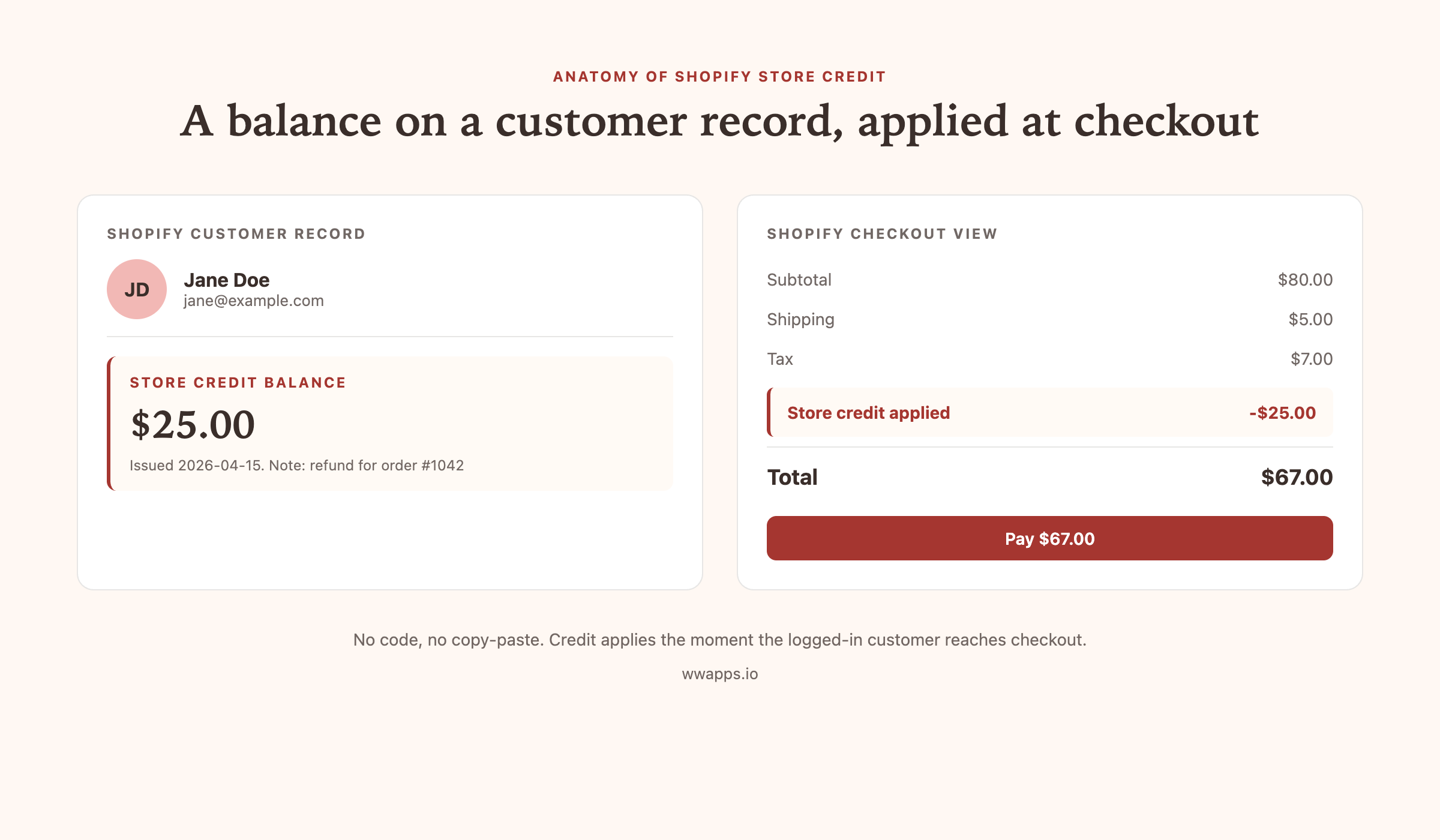
Shopify store credit is a balance attached to a specific Shopify customer record. The merchant can add to that balance, the customer can see it on their account page, and at checkout the balance applies automatically as a discount line. There is no code, no coupon, no email forwarding.
The most important thing to understand is that store credit is not a gift card. A gift card is a product. The buyer pays for it, gets a code, and the code can be redeemed by anyone. Store credit is a balance, locked to one customer record. The customer is both the recipient and the redeemer. We covered the full distinction in our store credit vs gift cards on Shopify guide.
Where Shopify store credit lives in the admin
If you are on Shopify Plus, store credit is a native feature in your customer record. You will see a Store credit card on each customer profile, with options to add or remove credit, set expiry, and view the transaction history.
If you are on any other plan (Starter, Basic, Grow, Advanced), Shopify does not give you store credit out of the box. You add it via an app. Bulk Store Credit by Win-Win Apps is one option, built specifically for merchants below Plus who need clean store credit without paying for a full loyalty suite. Balances are stored on Shopify customer metafields, so the data lives inside your shop, not on a third-party server.
How Shopify store credit works at checkout
This is where most merchants get confused. The flow is actually very simple, and it is the same on Plus as on Basic.
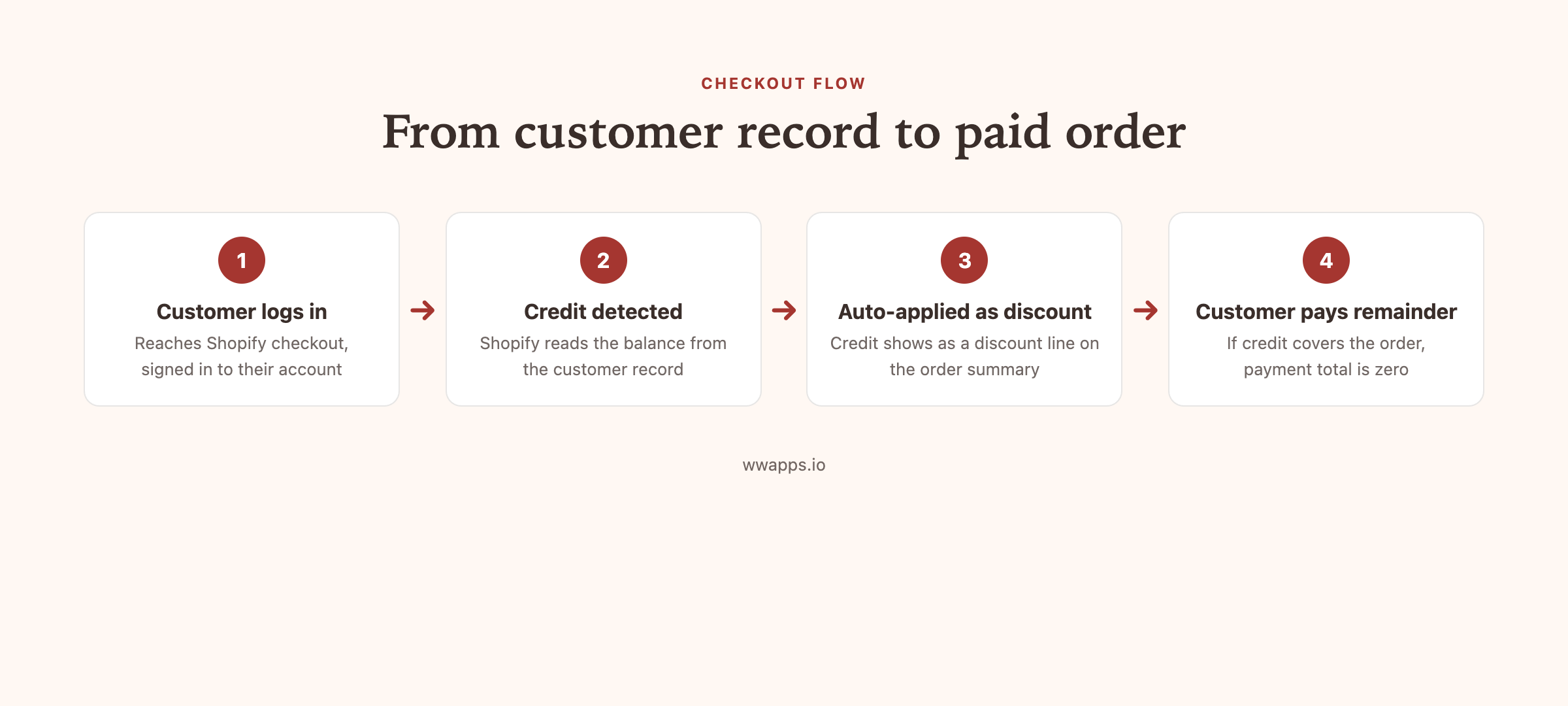
The customer adds products to cart and clicks checkout. They are required to be logged in for the credit to apply (Shopify customer accounts must be enabled, which they are by default). At checkout, the order summary shows the product subtotal, shipping, tax, and a new line: "Store credit applied: -$X". The total drops by the amount of credit applied. If the credit covers the full order, the payment total is zero and Shopify processes the order without charging a card. If it does not, the remainder is charged as normal.
For more on the mechanics including edge cases like guest checkout, subscription orders, and B2B, read our deep dive on how store credit works at Shopify checkout.
Which Shopify plans support store credit
This is the most asked question in the Shopify community on this topic, so let us settle it cleanly.
Native Shopify store credit is built into the platform on Shopify Plus. If your store is on Plus, you can issue and redeem store credit in the admin without any app installed.
For all other plans (Shopify Starter, Basic Shopify, Shopify, Advanced Shopify, Shopify Retail), the native store credit feature is not available. You add store credit through a third-party app. The store credit experience for both the merchant and the customer is identical to Plus, the only difference is that the data is stored in the app rather than as a first-party Shopify object.
So the answer to "do I need Plus for store credit on Shopify" is no. You do not need Plus. Apps like Bulk Store Credit by Win-Win Apps fill the gap on every other plan.
How to issue Shopify store credit to a single customer
The single-customer flow is short. Open the customer record in Shopify admin. Find the store credit card (native if you are on Plus, app-installed otherwise). Click Issue credit. Enter the amount, add an optional internal note like "refund for order 1042" or "loyalty thank-you," and confirm. The customer gets an email and the balance is live for the next checkout.
Step-by-step screenshots are in our how to issue store credit on Shopify guide.
How to refund a Shopify order to store credit instead of cash
Refunding to store credit instead of cash is one of the highest-leverage moves a Shopify merchant can make for retention. Stores that switch refunds to credit see somewhere between 15 and 35 percent of refunded customers come back and place a follow-up order within 60 days.
The flow is: open the order, decide the refund amount (most stores offer the full original order value, sometimes plus a small bonus to encourage the return), issue the credit on the customer record, then mark the original order refunded for zero in Shopify. The credit is now live on the customer balance and the cash never leaves your shop.
Full step-by-step is in how to give store credit instead of a refund on Shopify.
How to bulk-issue Shopify store credit via CSV
This is the move that wins back lapsed customers. Build a customer segment in Shopify admin (for example, customers who placed at least one order whose last order was between 90 and 365 days ago). Export the segment as a CSV. Drop the CSV into the bulk credit tool, set a flat amount per customer, add a note like "Q2 win-back," and confirm. Every customer in the segment gets credit at the same time, with notification emails queued automatically.
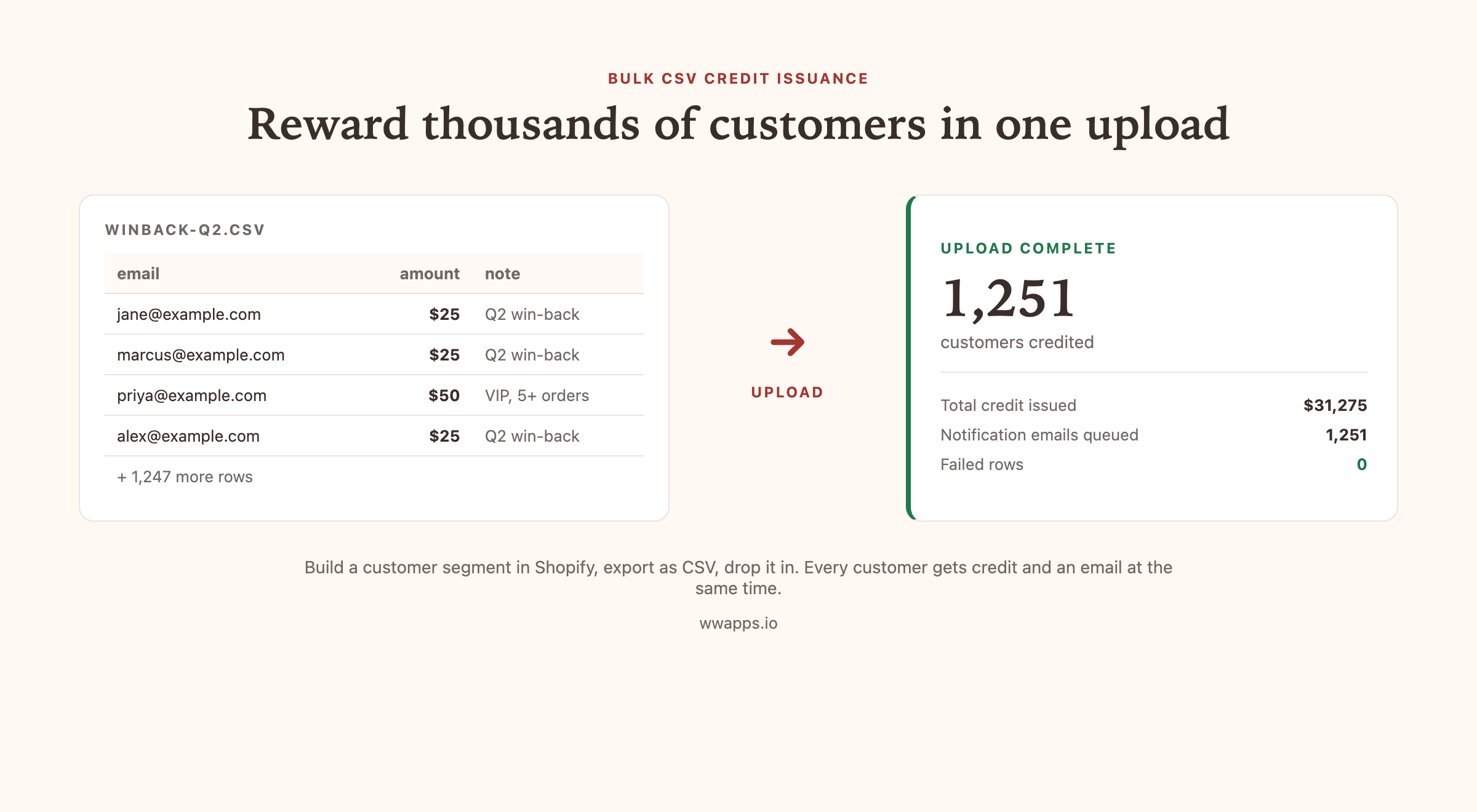
Shopify itself cannot do this. Native store credit, even on Plus, issues one customer at a time from the customer record, and there is no CSV import or bulk action anywhere in the admin. Bulk issuance is the specific gap that Bulk Store Credit exists to fill: CSV upload on every plan including Basic, and bulk issue by customer filter on Pro.
The full playbook including segment definition, credit amount sizing, email copy, and how to measure redemption is in win back lapsed Shopify customers with store credit. The CSV format and the amounts that actually work are in how to bulk issue store credit via CSV, and the no-CSV version is in bulk issue store credit to a customer segment.
Store credit or gift cards?
The two get conflated constantly. Store credit is a balance locked to one customer that applies itself at checkout. A gift card is a transferable code that anyone holding it can redeem, and the buyer usually paid for it.
Use store credit for refunds, loyalty, apologies and win-back. Use gift cards when the value has to be handed to someone, printed, or bought by a company for its staff. If that is your case, see the Shopify bulk gift cards guide and Bulk Gift Cards, which creates hundreds of native Shopify gift cards from one CSV in any currency you sell in.
Shopify store credit accounting treatment
This is where merchants get tripped up. Store credit is not a gift card and the accounting treatment differs.
When you issue store credit as a refund, no new revenue is created. The original sale is reduced by the credit value. This is the simplest case and most accountants treat it as a contra-revenue line.
When you issue store credit as a marketing gesture (for example, a $25 thank-you to your VIPs), it sits as a future discount on a future sale. It is not a deferred liability the way a gift card sale is, because no money was paid for it. Treatment varies by jurisdiction so verify with your accountant for your country.
When the customer redeems store credit on a future order, the order shows the credit as a discount line. Revenue is recognized for the net amount paid (cash plus the original sale value the credit reduced).
Common Shopify store credit mistakes
Issuing a gift card to refund an order. Now the customer has a code they can lose, share, or forget. Use store credit instead.
Trying to run a points loyalty program with native gift cards. Gift cards do not support partial issuance, balance accumulation across orders, or per-customer rules. Use a store credit app.
Not requiring customer accounts at checkout. Store credit only applies when the customer is logged in. If you allow guest checkout, customers with credit will sometimes pay full price. Either require accounts or add a banner reminding customers to log in.
Letting balances accumulate forever. Set a 12-month expiry on each credit so balances clear if a customer goes inactive. Otherwise your future-discount liability balloons over time.
Best Shopify store credit apps
If you are on Plus, native is the default and works fine for simple cases. For everything else, here is the honest short list. Our full breakdown including pros, cons, and pricing is in best Shopify store credit apps.
- Bulk Store Credit by Win-Win Apps. Built for merchants below Plus who need clean store credit. Free tier with display widget plus 20-row CSV. $49/mo for unlimited bulk CSV. Works on every plan. Carries the Built for Shopify badge, Shopify's highest quality standard.
- Rise.ai. The big name in the gift card and store credit space. Bundles store credit with a full gift card storefront and loyalty engine. Better choice if you also need the gift card platform and have the budget. Starts at $19.99/mo plus per-order fees.
- Koin. Cashback automation on native store credit, currently free. Good if automated cashback rules are your main goal, keep an eye on the free-for-now pricing.
- Redeemly. Cashback loyalty with referrals, priced by your monthly order count ($19 to $49/mo).
- Pabloo. Broad credit suite with memberships and top-ups. 3.8 rating on the App Store.
- Growave. Loyalty suite that includes store credit as one of many modules. Good if you want store credit plus referrals, reviews, and points all bundled.
Shopify store credit FAQ
Does Shopify have store credit built in? Shopify has native store credit on Shopify Plus. For Basic, Grow, and Advanced plans, store credit is added via a third-party app such as Bulk Store Credit by Win-Win Apps.
How do I issue Shopify store credit? Open the customer record, click Issue credit on the store credit card, enter amount and optional note, confirm. Customer gets an email and the credit applies automatically at next checkout.
Can I refund a Shopify order to store credit? Yes. Issue the refund amount as credit to the customer, then mark the original order refunded for zero. The customer keeps the value as a balance.
Does Shopify store credit work on Basic and Starter? Yes via apps. Bulk Store Credit by Win-Win Apps works on every Shopify plan.
Does store credit expire? Only if you set an expiry. We recommend setting expiry on each credit (typically 6 to 12 months) so inactive balances clear from your books.
Can a customer transfer store credit to another customer? No. Store credit is locked to one customer record. If the customer wants to gift the value to someone else, sell them a gift card instead.
Can store credit and a discount code be applied to the same order? Yes by default. The discount code applies first, then the store credit applies on top of the discounted subtotal. You can configure most apps to disable code stacking if you do not want this.
Where to start
If you are on Plus, the native store credit feature is enough for most cases. Start there.
If you are on any other Shopify plan, install Bulk Store Credit by Win-Win Apps. The free tier covers the customer-facing widget and 20 rows of CSV, which is enough to test the whole flow on your store. Upgrade to Pro ($49/mo) when you start running real win-back campaigns.
If you need a full loyalty platform with gift cards, points, and referrals, look at Rise.ai instead.
Try Shopify store credit on your store today.
Free plan, every Shopify plan supported, no credit card to install.