
Retention guide
Shopify store credit policy: a template you can copy
A clear store credit policy template for your Shopify store. Covers expiry, refund rules, transferability, and the language to put on your policy page.
Why your store needs a written policy
Once you start issuing Shopify store credit (refunds to credit, win-back campaigns, VIP rewards, wholesale rebates), customers will ask questions. Does it expire? Can I get cash instead? Can I transfer it? What happens if I close my account?
Without a written policy, your support team answers these questions inconsistently, which creates friction and trust problems. With a clear policy on a public page, you set expectations once and your team has something to point to.
This guide gives you a template policy you can copy, modify, and publish on your Shopify store. Plus the seven decision points behind each clause so you can tailor the policy to your business.
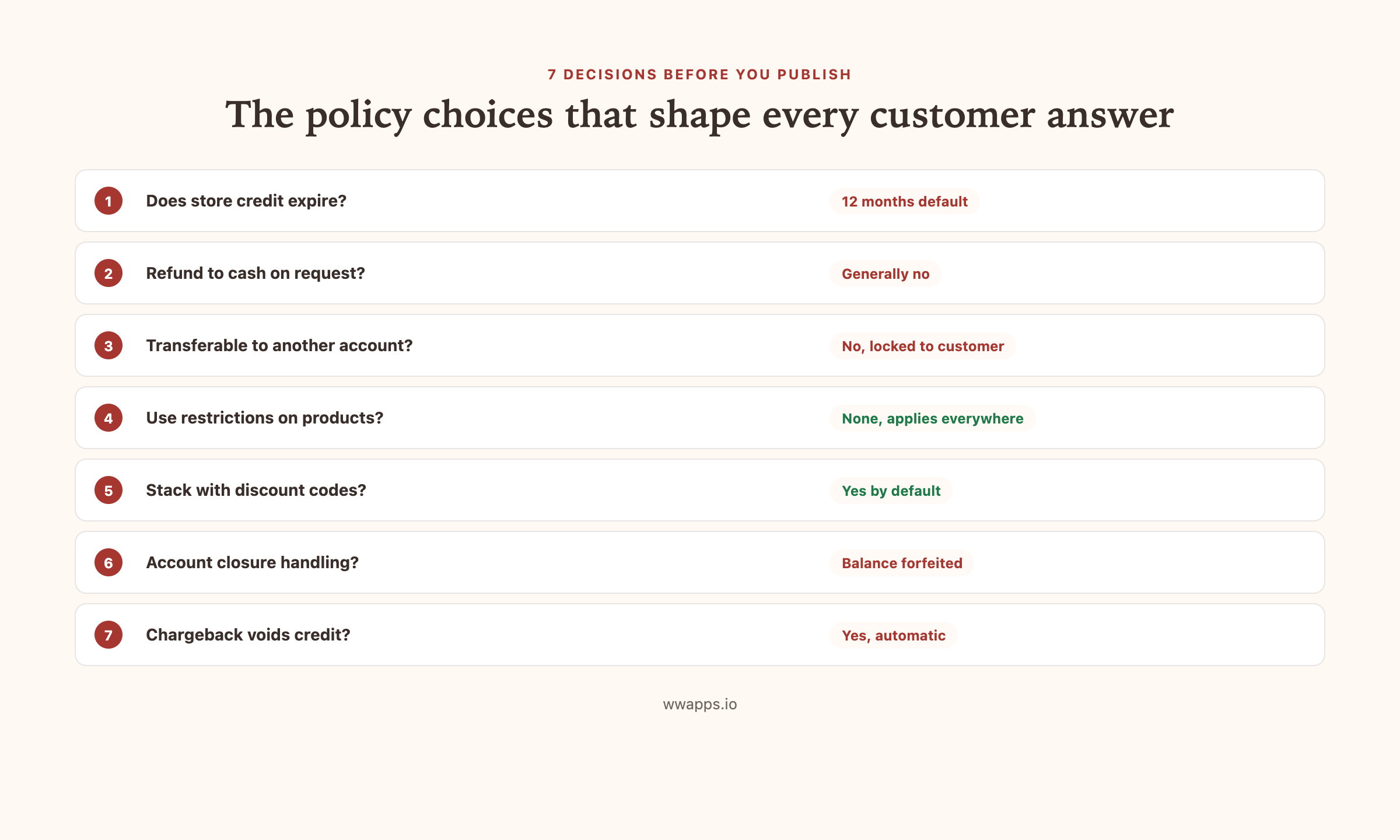
The 7 decision points
Before you copy the template below, decide on these seven things. Each one corresponds to a clause in the policy.
1. Expiry
Do credits expire, and after how long? Most stores set 12 months for retail and 6 months for wholesale. A small number set no expiry at all, which is generous but creates a long-tail liability problem.
Pick one and bake it into the policy. Bulk Store Credit by Win-Win Apps lets you set per-credit expiry so you can vary by program if needed.
2. Refund to cash
Can a customer convert credit back to cash, and under what circumstances? Most stores say no by default but make exceptions for very large balances or for customers who closed their account.
Be honest about the policy. Hiding that you do not refund to cash erodes trust faster than just stating it.
3. Transferability
Can a customer transfer credit to another customer or another email? Almost always no. This is the whole point of store credit (vs gift cards) so make this explicit.
4. Use restrictions
Can the credit be used on every product, or are there exclusions (gift cards, sale items, certain SKUs)? Most stores allow on everything, which is the better customer experience.
5. Stacking
Can store credit be used at the same time as a discount code or a gift card? Most stores allow stacking. The technical default in Bulk Store Credit by Win-Win Apps is to allow stacking, configurable.
6. Account closure
What happens to a credit balance if the customer closes their account? Most stores forfeit the balance. Some refund to cash if the balance is meaningful. Decide upfront.
7. Fraud / chargebacks
What happens if the original order that generated the credit is later charged back? The credit is voided and the customer is notified. This protects you from chargeback abuse.
The template
Copy this onto a public page on your Shopify store at /policies/store-credit/ or similar. Modify the bracketed parts to fit your business.
Store credit policy
This page describes how store credit works on [Your Store Name].
What is store credit? Store credit is a balance attached to your customer account on our store. We may issue store credit to your account in several situations: as a refund for a returned order, as a thank-you to repeat customers, as a win-back gesture if you have not shopped with us for a while, or as part of a wholesale rebate program. The credit applies automatically at checkout when you are signed in to your account.
Does store credit expire? Yes. Each credit issued to your account has an expiry date, typically [12 months] from the issue date. The expiry date is shown on your account page. Once a credit expires, it is removed from your balance and cannot be reinstated.
Can I get cash instead? Generally no. Store credit can only be used for purchases on our store. We may make exceptions in unusual circumstances, please contact our support team if you have a specific situation.
Can I transfer my credit to someone else? No. Store credit is locked to your customer account. If you want to give value to a friend or family member, please use a gift card instead.
What can I use store credit on? Store credit can be applied to any product on our store, including sale items. [Customize: List exclusions if any.]
Can I stack store credit with a discount code? [Yes / No]. Store credit applies to the post-discount subtotal, after any code is applied.
What happens to my credit if I close my account? Any unredeemed credit balance is forfeited when an account is closed.
What if I get a chargeback on the original order that generated my credit? If the original order is reversed via chargeback, any related store credit is voided and removed from your account. We will notify you by email if this happens.
Where can I see my balance? Your current store credit balance and transaction history are visible on your account page at [yourstore.com/account]. You will also receive an email each time your balance changes.
Questions? Contact us at [support@yourstore.com] and we will help.
Where to put the policy on your store
Three locations make sense:
- Footer link. Add “Store credit policy” to your footer policies list, alongside Refund Policy and Privacy Policy.
- Account page. Show a short summary on the customer’s account page next to their balance, with a link to the full policy.
- Email footer. When you send credit notification emails, include a one-line link to the policy.
If you have a returns or refund policy page, link to the store credit policy from that page too. Customers reading about returns will often want to know how the refund-to-credit option works.
Common policy mistakes
Hiding the expiry. Customers feel cheated when their balance disappears with no warning. State the expiry clearly and have your tool send reminder emails 30 days before expiration.
Vague language about cash refunds. “We may consider cash refunds at our discretion” creates more arguments than it solves. Pick a clear default and stick to it.
No mention of fraud handling. If you do not state that chargebacks void credit, you will eventually have a customer who keeps the credit AND files a chargeback. Build the protection into the policy.
Different policies in different places. Make sure your policy page, your terms of service, your account page widget, and your customer support team all say the same thing.
Tools that help operate the policy
The policy is only as good as the tool enforcing it. Bulk Store Credit by Win-Win Apps handles per-credit expiry, an audit log of every issue and redemption, automatic email notifications with the current balance, and a clean export for accounting reconciliation. Free tier covers the basics, Pro at $49 per month for full bulk operations.
Where to go next
For the full guide on Shopify store credit including checkout mechanics, plan compatibility, and accounting, read Shopify store credit, the complete merchant guide.
For the bookkeeping side of store credit, see Shopify store credit accounting.
Keep reading
More guides you might need.
3 min read
How to add one-tap reorders and a Buy It Again page to Shopify
Let repeat customers rebuy past orders in one tap with every option preserved, and reward the reorder with store credit.
3 min read
How to auto-reward customers with store credit on Shopify
Set up rules that issue store credit automatically when a customer hits a milestone, like second order or $500 lifetime spend.
5 min read
How to bulk issue Shopify store credit to a customer segment
Issue store credit to every customer matching a Shopify segment, without exporting a CSV. The filter-based workflow for win-back, VIP and apology campaigns.
6 min read
How to bulk issue store credit on Shopify via CSV
Credit 100, 500 or 5,000 Shopify customers in one upload. The CSV format, the amounts that work, and the mistakes that turn a win-back campaign into a giveaway.
Need help with this on your store?
We build free Shopify apps for the simple stuff. Browse the full set.